
Concepts
- Earlier post, Sending messages between threads via Android Handler, Looper, MessaqeQueues – My sky (freewindcode.com), communication between multiple threads in Android Framework has been explained. This post will focus on sending data between processes.
- The messages are wrapped in
Parcelwhich are used as argument toTransactorOnTransactfunction to send and receive data between processes.- The maximum size of data that an android::Parcel can carry is limited by the available memory on the system and the underlying implementation of the Parcel class. It's recommended to avoid sending large amounts of data through a Parcel. Instead, it's better to use file descriptors or a memory-mapped file to pass large amounts of data between processes.
- Primitive data types such as int, string and
Binderobject could be sent as Parcel - Note that we can send pointer as
Parcel. However, since different processes cannot access each other's memory, the actual and expected data is not retrievable at the receiving end. Instead we should pass a reference. - For example, When passing a
sp<IBinder>across different processes using Android Binder, only the binder reference is passed (not the actual object that the binder refers to). In order to access the object on the other side of the binder reference, the target process needs to use the binder reference to obtain a remote interface to the object.
- The
sending_message_classimplementsBpInterfaceand invokesTransactfunction. - The
receiving_message_classimplementsBnInterfaceand overridesonTransactfunction - It is advisable to create an interface whose concrete classes also inherit
BpInterfaceandBpInterface
Implementation
Send simple data through Android Binder and receive return via a reply
- The following program implements an
ICommunicationinterface which defines pure virtual functionsgetSignal. The concrete classesBpCommunicationandBnCommunicationinherits ICommunication andBpInterfaceandBpInterface. This applies the concept of "template class" BpCommunicationwraps up data in Android::Parcel and invokesTransactthat sends data to another process via Android Binder.BnCommunicationimplementsOnTransactthat reads data from Parcel and invokesgetSignal. Note thatBnCommunicationis not yet a concrete class. It is still an abstract class that has not implemented the pure virtual functionsgetSignal- MySensor class inherits
BnCommunication. It implementsgetSignal. - The data is wrapped in Parcel container. In this case, an integer value is written to Parcel in sending process, and read from Parcel in reading process. Note that the callback function (or the function pointer) is not passed to Parcel.
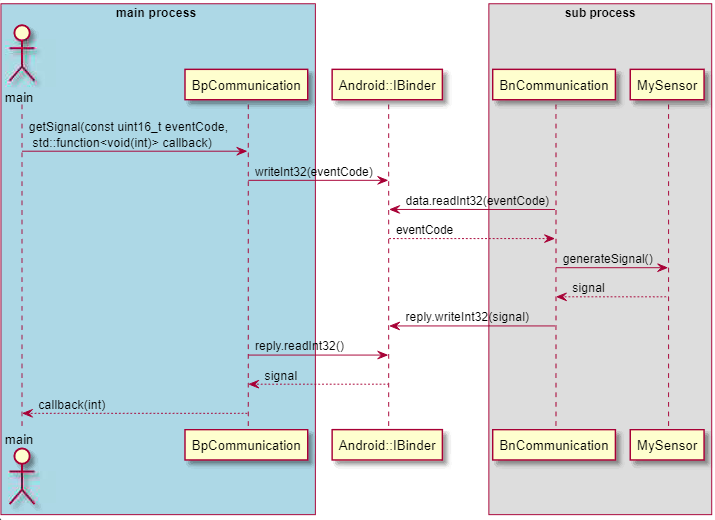
File ICommunication.h
#ifndef ICOMMUNICATION_H
#define ICOMMUNICATION_H

#include <binder/IInterface.h>

class ICommunication : public android::IInterface {
public:
    DECLARE_META_INTERFACE(Communication);

    virtual void getSignal(const uint16_t eventCode, std::function<void(int)) = 0;
};

#endif // ICOMMUNICATION_HgetSignalaccepts aneventCodeand a callback function.
File ICommunication.cpp
#include "ICommunication.h"

#include <binder/Binder.h>
#include <binder/Parcel.h>

#define GET_SIGNAL 0

namespace android {

class BnCommunication: public BnInterface<ICommunication> {
 public:
  virtual status_t onTransact(uint32_t code, const Parcel &data,
                              Parcel *reply, uint32_t flags = 0) {
    switch (code) {
      case GET_SIGNAL: {
        // read input data from Parcel
        uint16_t eventCode = data.readInt16();
        uint32_t result = generateSignal();
        // write result to Parcel reply
        reply.writeInt32(result);
        return NO_ERROR;
      }
      default:
        return BBinder::onTransact(code, data, reply, flags);
    }
  }
};

class BpCommunication : public BpInterface<ICommunication> {
public:
    BpCommunication(const sp<IBinder>& impl)
        : BpInterface<ICommunication>(impl) {}

    virtual void getSignal(const uint16_t eventCode, std::function<void(int)> callback) override {
        Parcel data, reply;
        data.writeInt16(eventCode);
        remote()->transact(GET_SIGNAL, data, &reply);
        // receive result as callback from Parcel reply
        uint_32 result = reply.readInt32();
        callback(result);
    }
};

class MySensor : public BnCommunication {
public:
    // the concrete implementation doesn't do anything! that is why it is clumsy
    void getSignal(int eventCode, std::function<void(int)> callback){
    }
    int generateSignal () {
        // Provide implementation for getSignal here
        int signal;
        return signal;
    }

}; // namespace android- In the above program,
BnInterface<ICommunication>is a template class from the Android framework. It is part of the Android Binder inter-process communication (IPC) system, and is used to implement a communication interface between two processes. -
BpInterfaceis the base class for a proxy interface, which is used by a client to make IPC calls to a remote service. The template argumentICommunicationspecifies the interface that the proxy will implement. In this case, the proxy implements theICommunicationinterface. TheBpCommunicationclass derives fromBpInterface<ICommunication>, and provides the implementation of the proxy. - By inheriting from
BpInterface<ICommunication>, theBpCommunicationclass can be used by a client process to make IPC calls to the remote service that implements theICommunicationinterface. - Parcel is a container to carry data inter processes. Parcel carries the integer
eventCodeto another process where an instanceMySensoris running. - Function pointer cannot be passed as a Parcel in Android's Inter-Process Communication. A parcel is a data container used to transport data between processes, and it can only contain simple data types like integers, floats, and strings. Function pointers are not a simple data type and cannot be passed in a parcel.
- Instead, it would be needed to pass the necessary information to call the function in the receiving process. This can be done by defining an interface with a callback function and passing an instance of that interface as a parcel. The receiving process would then call the function on the instance to trigger the desired behavior. This is a common pattern used in Android's IPC framework.
- Note that a pointer carries memory address. Thus the content at the location is not accessible in another process, and passing pointer will not carries expected value inter process.
- Next improvement, we will use IBinder or a new class. A Binder object could be passed to and read from Parcel, and thus its callback function could be invoked.
main.cpp
#include <iostream>
#include "ICommunication.h"
#include "MySensor.h"

#include <binder/IPCThreadState.h>
#include <binder/ProcessState.h>
#include <binder/IServiceManager.h>

using namespace android;

int main(int argc, char* argv[]) {
    sp<ProcessState> proc(ProcessState::self());
    ProcessState::self()->startThreadPool();
    // start service
    MySensor mySensor;
    android::defaultServiceManager()->addService(String16("service.communication"), &mySensor);
    IPCThreadState::self()->joinThreadPool();
    // get service, we have to "get service" to receive reply
    sp<ICommunication> communication = interface_cast<ICommunication>(defaultServiceManager()->getService(String16("service.communication")));
    if (communication != NULL) {
        int signal = communication->getSignal("EVENT_CODE", [] (int s) {
            std::cout << "Received signal: " << s << std::endl;
        });
        std::cout << "Signal: " << signal << std::endl;
    }
    return 0;
}- note that main's thread and
BpCommunication(alsocommService) would be running on the same process. Thecallbackis on the main thread. The callback printed out the received value from Parcelreply. - The request is passed into Binder, and sent to another process.
BnCommunicationreceives the parcel data, reads it and invokesMySensor::generateSignalto return the signal as an integer value. - We will discuss how to add
ICommunicationservice to androidIServiceManagerin the next post
Send and receive a Binder object through Binder.
- In Android, you can pass an instance of a class that implements an interface as a Parcel. You can use the
writeStrongBinder()method of theParcelclass to write asp<IBinder>object to a Parcel, which can hold a reference to the implementation of an interface. Then, on the receiving end, you can use thereadStrongBinder()method to read thesp<IBinder>object and cast it to a reference to the implementation of the interface. - In this program, we implement
IReceiverinterface. The interface defines the pure virtual functiononSignalReceivedthat accepts the return value. - the reference of
sp<MyReceiver>is carried by Parcel. But before sending, we have to castsp<MyReceiver>as a Binder object using asBinder function. - After receiving the Parcel data, we convert Binder object back to
sp<MyReceiver>usinginterface_castfunction. - In the returning process,
MyReceiverinvokes its callback function. Hence, the returning behavior, printing the out the output on main process, performs as expected.


IMyReceiver.h
#ifndef IMYRECEIVER_H
#define IMYRECEIVER_H

class IMyReceiver { public: virtual void onSignalReceived(uint_32 signal) = 0; };

#endif // IMYRECEIVER_H
IMyReceiver.cpp
#include <iostream>
#include <list>
#include <ICommunication.cpp>
using namespace std;

class MyReceiver : public IMyReceiver {
public:
    void onSignalReceived(uint_32 signal) override {
        cout << "Received signal: " << signal << endl;
    }
    void saveSignal(uint_32 signal){
       signal_t = signal;
    }
private:
    uint_32 signal_t;
};
ICommunication.h
#include <binder/Binder.h>
#include <binder/Parcel.h>

#include "IMyReceiver.h"

#define GET_SIGNAL 0

class ICommunication : public IInterface {
public:
    virtual void getSignal(uint_16 eventCode, const sp<IMyReceiver> &receiver) = 0;
};
ICommunication.cpp
#include <binder/IInterface.h>

#include "ICommunication.h"
#include "IMyReceiver.h"

class BpCommunication: public BpInterface<ICommunication> {
 public:
  BpCommunication(const sp<IBinder> &impl)
      : BpInterface<ICommunication>(impl) {}

  virtual void getSignal(const uint_16 &eventCode,
                         const sp<IMyReceiver> &receiver) {
    Parcel data, reply;
    data.writeInterfaceToken(ICommunication::getInterfaceDescriptor());
    data.writeInt16(eventCode);
    // write the receiver to Parcel data
    sp<IBinder> binder = receiver->asBinder();
    data.writeStrongBinder(binder);
    remote()->transact(GET_SIGNAL, data, &reply);
    // read the receiver from Parcel reply
    receiver = interface_cast<IMyReceiver>(reply.readStrongBinder())
    // callback function is invoked on main process
    receiver -> onSignalReceived();
  }
};

class BnCommunication: public BnInterface<ICommunication> {
 public:
  virtual status_t onTransact(uint32_t code, const Parcel &data,
                              Parcel *reply, uint32_t flags = 0) {
    switch (code) {
      case GET_SIGNAL: {
        String16 eventCode = data.readString16();
        // read the receiver from Parcel data
        sp<IMyReceiver> receiver =
            interface_cast<IMyReceiver>(data.readStrongBinder());
        getSignal(eventCode, receiver);
        // write the receiver to Parcel reply
        sp<IBinder> binder;
        binder = receiver->asBinder();
        reply.writeStrongBinder(binder);
        return NO_ERROR;
      }
      default:
        return BBinder::onTransact(code, data, reply, flags);
    }
  }
};

class MySensor : public BnCommunication {
public:
    void registerReceiver(IMyReceiver *receiver) {
        mReceivers.push_back(receiver);
    }
    void getSignal(int eventCode,  const sp<IMyReceiver> &receiver) {
        // add receiver to the receiver list
        registerReceiver(*receiver);
        // Provide implementation for getSignal here
        int signal = rand() % 100;
        // save the signal to receiver private member
        receiver->saveSignal(signal);
        }
    }

private:
    list<IMyReceiver *> mReceivers;
};- Note that
getSignalfunction declared byICommunicationnow accepts an pointer reference ofIMyReceiver's instances instead of a callback function. - Note that we don't pass a pointer to processes. When passing a
sp<MyReceiver>orsp<IBinder>across different processes using Android Binder, only the binder reference is passed (not the actual object that the binder refers to). In order to access the object on the other side of the binder reference, the target process needs to use the binder reference to obtain a remote interface to the object.
/* Main process */
// change IMyReceiver to IBinder
sp<IBinder> binder = receiver -> asBinder();
// wrap Binder to Parcel to send away
Parcel data;
data.writeStrongBinder(binder)

/* Subprocess */
// read Binder from Parcel
Parcel reply;
sp<IBinder> binder = reply.readStrongBinder();
// Use the binder reference to obtain a remote interface to the object
sp<IMyReceiver> receiver = interface_cast<IMyReceiver>(binder);
// Call a method on the remote interface
myInterface->myMethod();- In sending process,
BpCommunicationwrites theMyReceiverpointer reference to Parcel usingdata.writeStrongBinder(receiver->asBinder()). Likewise,BnCommunicationalso does. asBinderretrieves the Binder object. It is needed becausereceiveris not yet a Binder object which could be carried as a Parcel.- In receiving process,
readStrongBinderreads the Binder object from the Parcel, and interface_castconverts theIBinderobject to anIMyReceiverobject - Therefore,
BnCommunicationhas to retrieve the receiver the from Parcel usingsp<IMyReceiver> receiver = interface_cast<IMyReceiver>(data.readStrongBinder())
main.cpp
#include <binder/IPCThreadState.h>
#include <binder/ProcessState.h>
#include <binder/IServiceManager.h>

#include <IMyReceiver.h>
#include <ICommunication.h>

int main(int argc, char ** argv) {
    if (argc == 1) {      // Main program that starts the requests
        sp<ProcessState> proc(ProcessState::self());
        ProcessState::self()->startThreadPool();

        MySensor mySensor;
        sp<ICommunication> communication = interface_cast<ICommunication>   (defaultServiceManager()->addService(String16("service.communication"),&mySensor));
        IPCThreadState::self()->joinThreadPool();

        MyReceiver myReceiver;
        communicationService->getSignal(1, &myReceiver);
    }
    if (argc == 2) {     // sub-process, MySensor program
        sp<IServiceManager> sm = defaultServiceManager();
        sp<IBinder> binder = sm->getService(String16("service.communication"));
        sp<ICommunication> comm= interface_cast<ICommunication>(binder);
        // can implement extra MySensor function on to output logs on this side
        //
    }

    return 0;
}- both
communicationServiceandmyReceiverrun on the same process. getSignalwill addmyReceiverto the receiver list that MySensor manages.MySensor::getSignalactually invokesmyReceiver::saveSignalto save the data in its private member. It does not invoke the callback function directly.onSignalReceivedis invoked in main thread, inBpCommunication, thus the returning process behaves as expected.- The program doesn't yet fully implement Event Driven architecture and multiple processes that Android Framework feature. In the next post, Part 2 – Event-Drive Architecture – Implementation with Android Framework , we will fully implement receivers running on different processes.
Reference: This post is heavily influenced by the guide from Ebixio » Using Android IPC binders from native code Author Gabriel Burca