
Concepts:
Even-Driven Architecture is employed in Android Framework. The framework provides the interfaces and APIs that work as managers; whereas users can implement components which perform roles as workers.
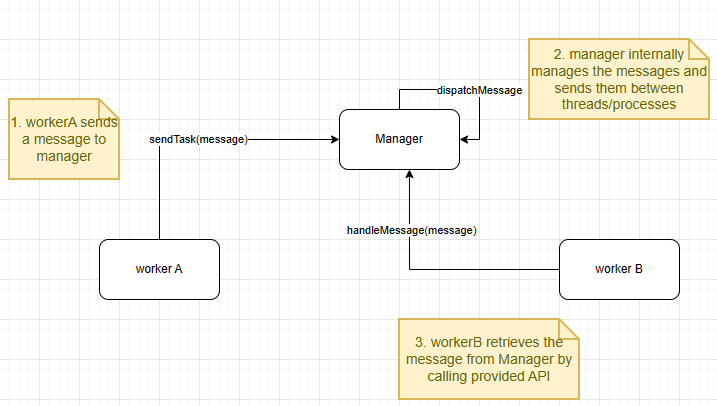
- Android Handler, Looper, and Messages Queues are used to send and receive messages between components on a single process, but multi-threads
- Android Binder is an Interprocess Communication mechanism that sends/receives message between different modules, running on different processes.
- The events or tasks are coded as integer values, by which corresponding logics should be invoked upon receiving the messages. In addition, data could be wrapped in the messages.
- Android Looper manages the messages that are to be sent and received by different Handlers and thus takes the role of the manager in the even-driven architecture. The user implement handler classes that are the workers that could be working on same of different threads.
- Android Service Manager itself is the manager that manages the communications between the workers on different processes. We will explore further how Android Service Manager help facilitate communications between commponents as part of Android Binder library.
Implementation
Sending messages between threads
- In the context of Event-Drive Architecture, Android Looper plays the role of the manager; it manages messages betweens Handlers.
- Android Handler provides the abstraction or API to send or receive messages. The child classes are workers and send/receive commands. The Handler uses the Looper to send messages and runnable tasks to the thread's message queue, and the Looper processes these messages and tasks one by one in the order they were added to the queue. The
SenderHandlerandReceiverHandlermust be associated with the same Looper. Android Message are data object that are sent/received by Handlers. The message formay may have the following:
- int
what: a code the identify the message - int
arg1,arg2: the data values sent in the message. - arbitrary object
- a
reply
- int
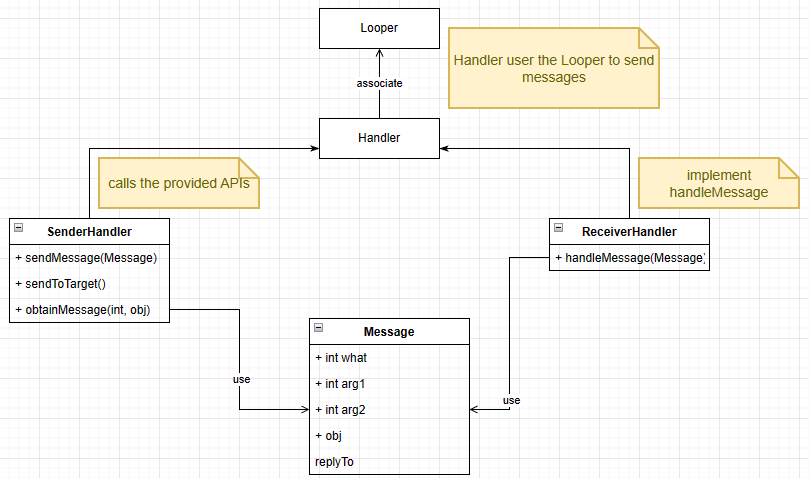
The following explains details on how to implement a simple program using Message Queue, Handlers and Looper. https://freewindcode.com/2023/02/13/sending-messages-between-threads-via-android-handler-looper-messaqequeues/
Sending messages via processes
- In the context of Event-Driven Architecture, Android Binder and Android Service Manager both works together as the manager that processes messages between different components.
- Users implement "components/modules" that run on multiple processes. Those are considered the "workers".
- Users implement "service" which make use of Android Binder and Android Service Manager to facilitate the communication between different components. The service must be registered to Android Service Manager. The service name must also be specified in
AndroidManifest.xmlfile. - The data sent/received are wrapped in a Android Parcel container. The Parcel can packed string, integer values,
IBinderobject. - The operation that sends data (
transactfunction) and receives data (onTransactfunction) can be 2 ways, that is sending data and reply could be passed in Parcel.- sending Data must be given, and may be empty.
- Reply data can be null
- Flag: default value = 0 and allow 2 ways communication. Otherwise, set it to FLAG_ONEWAY.
In earlier post, Sending messages between processes using Android Binder, we have explored the communication from module MySensor to MyReceiver using ICommunication service. User in main process can invoke a Remote Procedure Call to MySensor that gets the signal. The request is sent with a integer code = GET_SIGNAL and an instance of MyReceiver. When a signal data is acquired in the other process, it is returned via the Reply Parcel. The instance of MyReceiver, which also store the signal data is wrapped in the Reply Parcel.
Note that an instance of MyReceiver could be wrapped in the Data and Reply Parcel. The signal data is saved as the internal member of MyReceiver.

The following Activity Diagram illustrates the call operations

Note: There are some mismatch between the activity diagram and the class diagram. Below are some fixing:
receiver->callback(int)means the receiver invokesonSignalReceived(int)- actor is
MyReceiverand can callBpCommunication::getSignal(code, receiver). The function in class digram of BpCommunication should takes 2 parameters.
Implementing a CallBack design pattern
- In the above section, we already implement
ICommunicationthat allows user toMySensor. The signal is received viaReplyParcel. In addition, the signal is sent back as an internal memory ofMyReceiver. In other words,MyReceiverinstance is converted to a Binder object and wrapped in Parcel container and sent back as reply. - In this section, we can implement
ICallbackservice that allowsMySensorto send signal back toMyReceiver. - In main process,
MyMachineclass has componentMyReceiver. It implementsregisterReceiverandgetSignal. Both functions have to useICommunicationto send data toMySensor.registerReceiverrequestsMySensorto add its membermyReceiver_to its list.getSignal requests for signal, same as earlier implementation
-
MySensoraddsmyReceiver_getSignal. However, to return data, instead of sending a reply Parcel, it will invokeICallBack::onSignalReceived. SincemyReceiver_is an instance of ICallBack, it can callBpCallBack::transactfunction will initiate sending signal data.

- both
ICommunicationandICallbackhave to register as service to Android Service Manager by user in main (or whatever module that uses the 2 services)service.Communicationandservice.Callbackare names inmanifest.xml- after adding service, run
ProcessStateandIPCThreadState
// on the server side or main process side or MyMachine side, we start service:
// note that we initialized the concrete classes that implement the BnCommunication or BnCallback
MySensor mySensor;
defaultServiceManager()->addService(String16("service.Communication"), &mySensor);

MyReceiver myReceiver;
defaultServiceManager()->addService(String16("service.CallBack"), &myReceiver);

android::ProcessState::self()->startThreadPool();
android::IPCThreadState::self()->joinThreadPool();- We still need to run a process at the receiving side. In that process, we have to run
getService.
// to get ICommunication service from client side (Main process/MyMachine Process:
android::interface_cast<ICommunication>
                (android::defaultServiceManager()->getService(android::String16(service.communication)));

// to get ICallback service from server side (MySensor process):
android::interface_cast<ICallback>
(android::defaultServiceManager()->getService(android::String16(service.callback)));- registering for
myReceiver_requires thatMyMachineclass has an association withICallback. Thus the class has a membersp<ICallBack>myReceiver_. - When
MyMachinesends a request to registermyReceiver_usingICommunication, it sends themyReceiver_to Binder usingICommunicationchannel. - to be specific, a reference to strong binder of
ICallbacktype is passed toICommunication::registerReceiveras an argument, which is then converted to a binder object by the functionasBinder. - in the receiving side, the Binder object is read via
readStrongBinderand casted back tosp<ICallback> - in addition, since
MyMachineusesICommunicationservice, it must get the service and check if the service is available when it starts to send the request.
const int REGISTER_RECEIVER = 1;
const int GET_SIGNAL = 2;

// class MyMachine
class MyMachine {
    public:
    void registerReceiver () {
        // check if ICommunicationService is up:
        communication_= android::interface_cast<ICommunication>
                (android::defaultServiceManager()->getService(android::String16(service.communication)));
        if (communication.get() != null){     //ICommunication must have been initialized
            myReceiver_ = new MyReceiver();   //Initialize MyReceiver
            communication->registerReceiver(receiver);  //call BpCommunication to send the request
        }
    }
    void getSignal() {
        // check if ICommunicationService is up:
        communication_= android::interface_cast<ICommunication>
                (android::defaultServiceManager()->getService(android::String16(service.communication)));
        if (communication.get() != null){     //ICommunication must have been initialized
            communication->getSignal();  //call BpCommunication to send the request for signal
        }
    }
    private:
    sp<ICommunication> communication_;
    sp<ICallBack> myReceiver_;
};

// excerpt of class BpCommunication
class BpCommunication : public BpInterface < ICommunication > {
    void registerReceiver ( sp<ICallBack>& receiver) {
        Parcel data, reply;
        data.writeInt32(code);
        sp<IBinder> binder = receiver->asBinder();
        data.writeStrongBinder(binder);
        remote()->transact(REGISTER_RECEIVER, data, &reply);
    }
    void getSignal() {};
};

// excerpt of class BnCommunication
class BnCommunication : public BnInterface < ICommunication > {
    status_t onTransact(uint32_t code, const android::Parcel& data, const     android::Parcel* reply, uint32_t flags){
        switch(code):
        {
            case REGISTER_RECEIVER: {
                CHECK_INTERFACE(ICommunication, data, reply);
                android::sp<ICallBack> receiver = android::interface_cast<ICallBack>(data.readStrongBinder());

                registerReceiver(receiver);   //MySensor class implements this function
            } break;
            case GET_SIGNAL: {
                // more implementation
            } break;
            default:
                 return BBinder::onTransact(code, data, reply, flags);
        }
    }
};- initiating request for signal from
MyMachineis done normally: the request is sent toBpCommunication, invoking BpCommunication::transact function. - on the receiving end, the
BnCommunication::onTransactreceives the request and performs logic to get signal data. - the result is sent back not by
Reply Parcelbut byICallBack::onSignalReceived. Since a reference tosp<ICallBack> myReceiverwas saved byregisterReceiverit could calledBpCallBack::onSignalReceivedfunction from theMySensor's process. The follow shows how MySensor is implemented
class MySensor : public BnCommunication {
     public:
     void registerReceiver (int code, sp<ICallback> &myReceiver){
          receivers.push_back(myReceiver);
     }
     void getSignal() {
          // logic to generate signal
          // return signal data
          // there should be more logic to get the particular receiver
          // for eg: a PID is stored into the receiver.
          if (receivers.front().get() != nullptr)     // receiver has to be initialized in main processed and registered
              receivers.front()->onSignalReceived();
     }
     private:
     list <sp<ICallback>> receivers;
}- Usually, IPC android design pattern would have a ServiceStub class that serves as a concrete class and implements BnCommunication. MySensor is an association or Friend class of ServiceStub that ServiceStub could call to run logic.
- Suppose that we write a simple program that take an argument, and if the arg = 1, it will be the client side (MyMachine) and if arg = 2, it will be the server side, the main function will be implemented as follow:
#include <utils/RefBase.h>
#include <utils/Log.h>
#include <binder/TextOutput.h>

#include <binder/IInterface.h>
#include <binder/IBinder.h>
#include <binder/ProcessState.h>
#include <binder/IServiceManager.h>
#include <binder/IPCThreadState.h>

int main(int argc, char **argv) {

    if (argc == 1) {    // client side (main process, MyMachine process)
        std::cout<<"My Machine";
        // the services are created
        defaultServiceManager()->addService(String16("service.communication"),new MySensor());
        defaultServiceManager()->addService(String16("service.callback"),new MyReceiver());

        android::ProcessState::self()->startThreadPool();

        IPCThreadState::self()->joinThreadPool();
        // initialize myMachine

        MyMachine myMachine;
        // myMachine sends request to MySensor.
        myMachine.registerReceiver();
        myMachine.getSignal();

    } else if (argc == 2) {       // server side, MySensor process)
        std::cout<<"My Sensor";

        // since we use service on this process, we have to get the service

        sp<IServiceManager> sm = defaultServiceManager();
        sp<IBinder> binder = sm->getService(String16(service.communication"));
        sp<ICommunication> comm = interface_cast<ICommunicatiom>(binder)

        binder = sm->getService(String16(service.callback"));
        sp<ICallback> callback = interface_cast<ICallback>(binder)
    }

    return 0;
}
References
This page is heavily influenced by the guided under Ebixio » Using Android IPC binders from native code. All credits to Gabriel Burca
Its like you read my mind! You appear to know a lot about
this, like you wrote the book in it or something. I think that you
can do with some pics to drive the message home a little
bit, but instead of that, this is great blog. A great read.
I will certainly be back.
Thank you for your kind words
Magnificent beat ! I would like to apprentice while you amend your web site, how can i
subscribe for a blog website? The account helped me a acceptable deal.
I had been a little bit acquainted of this your broadcast provided bright clear concept
Thank you for your kind words. You can subscribe to newsletter by inputting your info (email) on the Newsletter box in the footer of the website or the Contact page. I blog to document knowledge that I am still learning every day. I am still very much a junior.
Hello! I just wanted to ask if you ever have any trouble with hackers?
My last blog (wordpress) was hacked and I ended up losing a few months
of hard work due to no backup. Do you have any methods to prevent hackers?
We all should backup the sites, and install 2 factor authentications for not only logging into the web hosting panel but also WordPress admin. For WordPress, we have to use plugins.
Link exchange is nothing else but it is simply placing the other
person’s weblog link on your page at proper place and other person will also do similar in favor of
you.
I will keep that in mind. Thank you.