
Introduction
In earlier blog, UI implementation in Android – Fragment, View binding and Navigation, I have explained the main idea:
- How fragments only displays view but also provides more flexibility to program
Viewand demonstrate its usefulness when implementing navigation between different pages orViews.
In this blog, I will explore about sharing data between Fragments, and make changes to UI via ViewModel, and LiveData.
Concepts
Model - View - ViewModel (MVVM) architecture
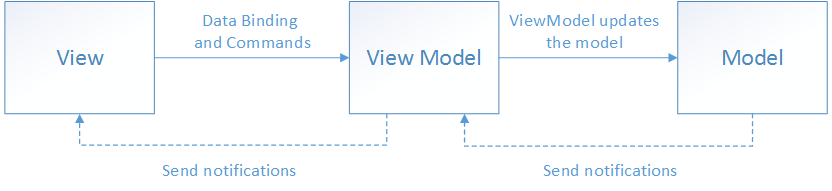
This architecture defines a pattern to update View based on (Data) Model, and View Model stands as the middleman.
- the interaction between
ViewandViewModelfollows could follow Observer-Subscriber patterns:Viewregisters to be subscriber toViewModel.ViewModelupdates theViewby callbacks, notification the subscriber.
- the interaction between
ViewandViewModelcould follow a more direct approach:ViewModelrequests data fromModelvia get/set.Modelreturns data.
MVVM doesn't limit its components' interactions to the above method of communications. Various blogs discuss of different alternatives. For example, this blog What Is MVVM (Model-View-ViewModel)? refers that View interact with ViewModel via Data Binding, while View Model interacts with Model by Observer-Subscriber patterns.
Note: VMVM note only allows a single Fragment to interact with data but also allows sharing data between Fragments. It could be implemented by using "shared" ViewModel between 2 Fragments.
ViewModel in Android
ViewModel is a plain class that holds the data you display in UI. It allows:
- holding data persistently through various
Fragment's lifecycle orActivity's lifecycle. - accessing data in Model.
The following illustrates the ViewModel's scope which is unchanged throught various Activity 's lifecycles.
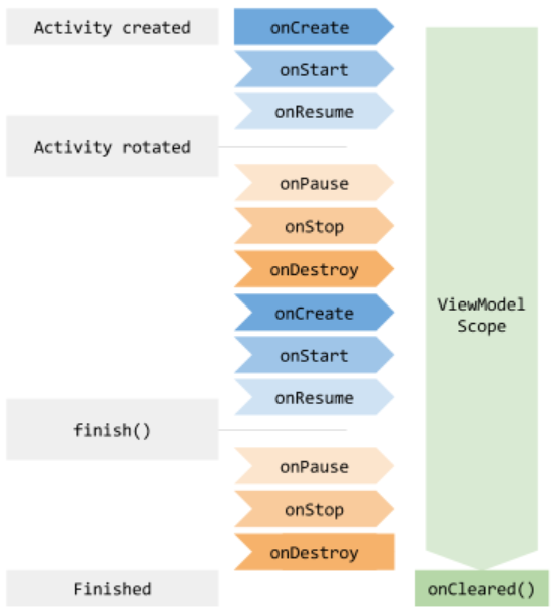
A ViewModel is always created in association with a scope (a fragment or an activity) and will be retained as long as the scope is alive. The following shows an EmployeeInfoViewModel be property and delegated by activityViewModels
class UpdateInfoFragment : Fragment {
     private val employeeInfoViewModel: EmployeeInfoViewModel by activityViewModels()
}activityViewModelsis Kotlin property delegate from the fragment-ktx artifact to retrieve the ViewModel in theUpdateInfoFragmentscope.EmployeeInfoViewModelis the class that inheritsViewModel. Note thatViewModelitself is a plain class that only means to hold data within its scope. To actually get/set data or interact withModelwe have to provide such implementation! This is whenLiveDatacome to help.
LiveData in Android
We have MutableLiveData that inherits LiveData in Android framework. MutableLiveData expose public functions to be used.
LiveData:
- holds individual data fields of ViewModel, but can also be used for sharing data between different modules in your application in a decoupled fashion.
public abstract class LiveData<T> {
     volatile Object mPendingData = NOT_SET;
}- holds a map of observers and counts number of observers. Thus any
Fragmentthat request data from Model should register observer toLiveDatafirst.
public abstract class LiveData<T> {
     private SafeIterableMap<Observer<? super T>, ObserverWrapper> mObservers =
            new SafeIterableMap<>();
}- notifies changes of data in asynchronous manner.
The following illustrates call flows:

Sample app MyID
MyID app includes 2 fragments: HomePageFragment and UpdatePageFragment.
BottomNavigationMenuprovides navigation between 2 fragments and was already described in the blog UI implementation in Android – Fragment, View binding and NavigationUpdatePageFragmentwill receive input from user and can update the changes onHomePageFragment.-
EmployeeInfoViewModelis the "shared ViewModel" for both fragments.UpdatePageFragmentcallsEmployeeInfoViewModelto update data. It provides the data toEmployeeInfoViewModelEmployeeInfoViewModelreceives new data and updates them to the `mObserver` map.HomePageFragmentreceives the new data via callback.
- The
Modelare just simple data,String. At this point we don't have to implement Model class.
Implementing View Model
EmployeeInfoViewModel.kt
package com.example.myid.viewmodel

import androidx.lifecycle.LiveData
import androidx.lifecycle.MutableLiveData
import androidx.lifecycle.ViewModel

class EmployeeInfoViewModel : ViewModel() {
    private val _name = MutableLiveData<String>()
    val name: LiveData<String> get() = _name

    private val _department = MutableLiveData<String>()
    val department: LiveData<String> get() = _department

    private val _employeeId = MutableLiveData<String>()
    val employeeId: LiveData<String> get() = _employeeId

    fun updateName(newName: String) {
        _name.value = newName
    }

    fun updateDepartment(newDepartment: String) {
        _department.value = newDepartment
    }

    fun updateEmployeeId(newEmployeeId: String) {
        _employeeId.value = newEmployeeId
    }
}
Using View Model class in fragments
- both fragments has
private val employeeInfoViewModel: EmployeeInfoViewModel by activityViewModels()- both fragments implements their interaction with
ViewModelinonCreateViewfunction.
- the
observerfunction has only 1 variable because the other is skipped, allowable by Kotlin. The second parameter is skipped:
//function prototype:
public void observe(@NonNull LifecycleOwner owner, @NonNull Observer<? super T> observer)
// actual function call:
employeeInfoViewModel.department.observe(viewLifecycleOwner)HomePageFragmentregisters observer toLiveData, which is name, department, employeeId. The observers will receive data via callback. For example:
employeeInfoViewModel.name.observe(viewLifecycleOwner) {
            // HomePageFragment receives the new data via callback
            name -> binding.textViewName.text = "Name: $name"
        }
HomePageFragment.kt
package com.example.myid

import android.os.Bundle
import android.view.LayoutInflater
import android.view.View
import android.view.ViewGroup
import androidx.fragment.app.Fragment
import androidx.fragment.app.activityViewModels
import com.example.myid.databinding.FragmentHomePageBinding
import com.example.myid.viewmodel.EmployeeInfoViewModel

class HomePageFragment : Fragment() {

    private var _binding: FragmentHomePageBinding? = null
    private val binding get() = _binding!!
    private val employeeInfoViewModel: EmployeeInfoViewModel by activityViewModels()

    override fun onCreateView(
        inflater: LayoutInflater, container: ViewGroup?,
        savedInstanceState: Bundle?
    ): View {
        _binding = FragmentHomePageBinding.inflate(inflater, container, false)
        return binding.root
    }

    override fun onViewCreated(view: View, savedInstanceState: Bundle?) {
        super.onViewCreated(view, savedInstanceState)

        employeeInfoViewModel.name.observe(viewLifecycleOwner) {
            // HomePageFragment receives the new data via callback
            name -> binding.textViewName.text = "Name: $name"
        }

        employeeInfoViewModel.department.observe(viewLifecycleOwner) {
            department ->
            binding.textViewDepartment.text = "Department: $department"
        }

        employeeInfoViewModel.employeeId.observe(viewLifecycleOwner) {
            employeeId ->
            binding.textViewEmployeeId.text = "Employee ID: $employeeId"
        }
    }

    override fun onDestroyView() {
        super.onDestroyView()
        _binding = null
    }
}
UpdatePageFragment.kt
package com.example.myid

import android.os.Bundle
import android.view.LayoutInflater
import android.view.View
import android.view.ViewGroup
import androidx.fragment.app.Fragment
import androidx.fragment.app.activityViewModels
import com.example.myid.databinding.FragmentUpdatePageBinding
import com.example.myid.viewmodel.EmployeeInfoViewModel

class UpdatePageFragment : Fragment() {

    private var _binding: FragmentUpdatePageBinding? = null
    private val binding get() = _binding!!
    private val employeeInfoViewModel: EmployeeInfoViewModel by activityViewModels()

    override fun onCreateView(
        inflater: LayoutInflater, container: ViewGroup?,
        savedInstanceState: Bundle?
    ): View {
        _binding = FragmentUpdatePageBinding.inflate(inflater, container, false)
        return binding.root
    }

    override fun onViewCreated(view: View, savedInstanceState: Bundle?) {
        super.onViewCreated(view, savedInstanceState)
        // UpdateInfoFragment calls EmployeeInfoViewModel to update data
        binding.buttonUpdate.setOnClickListener {
            employeeInfoViewModel.updateName(binding.editTextName.text.toString())
            employeeInfoViewModel.updateDepartment(binding.editTextDepartment.text.toString())
            employeeInfoViewModel.updateEmployeeId(binding.editTextEmployeeId.text.toString())
        }
    }

    override fun onDestroyView() {
        super.onDestroyView()
        _binding = null
    }
}Note: The name of fragment file must be consistent and will be used in nav_graph.xml
fragment_home_page.xml:
<?xml version="1.0" encoding="utf-8"?>
<LinearLayout xmlns:android="http://schemas.android.com/apk/res/android"
    xmlns:app="http://schemas.android.com/apk/res-auto"
    android:id="@+id/main_page_id"
    android:layout_width="match_parent"
    android:layout_height="match_parent"
    android:orientation="vertical"
    android:padding="16dp"
    android:gravity="center">
    <com.google.android.material.card.MaterialCardView
        android:layout_width="wrap_content"
        android:layout_height="wrap_content"
        android:layout_gravity="center_horizontal"
        app:cardCornerRadius="20dp"
        app:strokeWidth="1dp"
        app:strokeColor="#002FFF"
        android:padding="2dp">
        <ImageView
            android:id="@+id/id_image"
            android:layout_width="wrap_content"
            android:layout_height="wrap_content"
            android:contentDescription="ID Image"
            android:src="@drawable/image_id" />
    </com.google.android.material.card.MaterialCardView>
    <LinearLayout
        android:layout_width="match_parent"
        android:layout_height="wrap_content"
        android:orientation="vertical"
        android:layout_gravity="center" />
    <TextView
        android:id="@+id/text_view_name"
        android:layout_width="wrap_content"
        android:layout_height="wrap_content"
        android:text="Name:"
        android:textAlignment="center" />
    <TextView
        android:id="@+id/text_view_department"
        android:layout_width="wrap_content"
        android:layout_height="wrap_content"
        android:text="Department:"
        android:textAlignment="center" />
    <TextView
        android:id="@+id/text_view_employee_id"
        android:layout_width="wrap_content"
        android:layout_height="wrap_content"
        android:text="Employee ID:"
        android:textAlignment="center" />
</LinearLayout>fragment_update_page.xml:
<?xml version="1.0" encoding="utf-8"?>
<LinearLayout xmlns:android="http://schemas.android.com/apk/res/android"
    android:layout_width="match_parent"
    android:layout_height="match_parent"
    android:orientation="vertical"
    android:padding="16dp"
    android:gravity="center">
    <!-- EditText for Name -->
    <EditText
        android:id="@+id/edit_text_name"
        android:layout_width="match_parent"
        android:layout_height="wrap_content"
        android:hint="Enter Name" />
    <!-- EditText for Department -->
    <EditText
        android:id="@+id/edit_text_department"
        android:layout_width="match_parent"
        android:layout_height="wrap_content"
        android:hint="Enter Department" />
    <!-- EditText for Employee ID -->
    <EditText
        android:id="@+id/edit_text_employee_id"
        android:layout_width="match_parent"
        android:layout_height="wrap_content"
        android:hint="Enter Employee ID" />
    <!-- Button to Update -->
    <Button
        android:id="@+id/button_update"
        android:layout_width="wrap_content"
        android:layout_height="wrap_content"
        android:text="Update" />
</LinearLayout>Note: As discussed in earlier blog, View binding was used. Thus, the naming of those XML files are important and will be used to generate binding respective classes
- binding
fragment_home_page.xmlgeneratesFragmentHomePageBindingclass. - binding
fragment_update_page.xmlgeneratesFragmentUpdatePageBindingclass.
Link to MyID app source code: Projects/Android/MyID
Conclusion:
At this point, UI implementation in Android – Fragment, View binding and Navigation and this blog have discussed the followings:
- How to displayed UI from
View. HowLayoutInflatergenerates View from XML resource file. - How a
Fragmentis more powerful thanViewand should be used to display UI. A use case, fragment navigation, is implemented to demonstrate such usefulness.- In addition, how
Viewbinding,NavController,NavHostFragmentare usefull tool to implement the use case.
- In addition, how
- How
ViewModeland the VMVM architecture helps with communication between UI and data. A use case, sharing data between fragments, is demonstrated.
In the next blog, I will demonstrate Data binding.